



An ad nobody sees is a receipt for nothing. Advertisers know it, so ad viewability is now one of the first numbers they check before they bid. If your slots sit where eyes never land, buyers notice fast. Then they pay less, or they stop showing up at all.
Table of Contents
- What Is Ad Viewability and Why Does It Matter?
- What Affects Ad Viewability? 7 Factors to Consider
- 4 Most Common Reasons for Low Ad Viewability
- How to Measure and Improve Ad Viewability Score?
- Strategies to Improve Ad Viewability
- Case Studies: Success Stories in Improving Ad Viewability
- FAQ
- Final Thoughts: Keeping Viewability High for the Long Run
The upside? Viewability is not fate. Layout, page speed, ad sizes, and a handful of settings all move it. Below, we cover what moves the number, why it drops, how to measure it, and how to improve ad viewability without turning your site into a billboard that readers flee from.
What Is Ad Viewability and Why Does It Matter?
Viewability tells you whether an ad had a fair shot at being seen. An ad can load at the very bottom of a long article and still count as “served,” even if the reader quit halfway. Viewability splits those ghost impressions from the ones a person could actually look at.
Advertisers care because they pay for attention, not for code that loads off-screen. Publishers care because buyers pay more for slots with a clean history. That’s why it comes up so often when advertisers are choosing where to place ads online. It’s the first filter, before price.
Defining Ad Viewability
The common rule comes from the Media Rating Council, and Google and most ad platforms follow it. A display ad counts as viewable when at least 50% of its pixels are on screen for one straight second. For video, it’s 50% of the player for two straight seconds.
Some buyers set tougher rules, like 100% in view or longer time. The idea doesn’t change, though. The ad has to sit on screen long enough for a human to notice it. One second sounds short. On a phone, during a fast scroll, it’s longer than you’d think.
Why It Matters for Publishers and Advertisers
Viewability is trust in number form. An advertiser who sees high scores on your site believes the money went somewhere useful. That buyer comes back, bids higher, and sometimes offers private deals that never reach the open auction.
Low scores do the reverse. Buyers trim their bids or skip your inventory, and some DSPs drop sites below a set score before the auction even starts. You never see those lost bids. You just see the average price sag month after month and wonder why.
How It Affects Revenue and Reader Attention
Ads that get seen get more clicks, more sales, and more people who remember the brand. Advertisers who see those results keep spending. Over time, strong viewability lifts your eCPM, the amount you earn per thousand impressions.
There’s a second, sneakier upside. Sites with good scores usually have clean layouts and fast pages, which readers like too. Good ad viewability and a good read tend to travel together. Fix one, and the other often follows without extra work. It’s one of the few places in ad tech where the reader and the buyer want the same thing.
What Affects Ad Viewability? 7 Factors to Consider
Several things decide whether an ad gets seen. Some are design, some are speed, some are human habits. Good news, you control most of them, and none needs a developer for weeks. A few take an afternoon in your ad server. Here are the seven that matter most.
1. Page Layout and Scroll Depth
Scrolling depth predicts viewability better than just about anything else. After the first screen, ads further down the page rarely get seen, and in fact are often skipped entirely when readers bounce away. Check your scroll data. A bottom ad is simply cheesecake if 6 out of 10 visitors never make it the middle of an article! Please move it higher, or next to the section that people actually read.
2. Ad Sizes and Format Choices
Some sizes stay on screen longer. Tall units like 300×600 stay visible through more of a scroll. The top of the page is owned by Wide units such as 970×250. Bigger isn’t always better, though. An ad that pushes the text aside, annoys readers and increases bounce rate. When it comes to video, remember the two-second rule. Player position and autoplay settings both count.
3. Site Speed and Core Web Vitals
Slow pages hurt viewability twice. People exit before the ad loads, or they see dull ads after the instant when they were actively reading. The loading speed, response time and layout stability is calculated through Core Web Vitals score from Google. Pages that score well usually show ads sooner. Sure, lazy loading (which delays the loading of an ad until a user reaches it) helps, but misconfigured lay outbound horror show lays down and the reader as fast as their feed can deliver }}> out
4. Placement Above the Fold vs. Below the Fold
It is common for ads that are above the fold (i.e. visible before the page finishes loading) to be viewed more often. Not guaranteed. A reader who scrolls past the top may not even grant a second of attention to the ad. Ads beneath the fold can perform well in or beside attention-holding content. Sticky ads naturally follow the reader as they scroll and remain onscreen. Use them carefully.
5. User Device and Screen Size
Phones and desktops behave differently. On a phone, one ad fills a big chunk of the screen, so it’s more likely to be seen. But mobile readers scroll quickly and bounce through apps. More content will fit on screen on desktop, but sidebar ads are easier to ignore. Responsive units that resize for each screen usually beat one fixed layout for everyone.
6. Header Bidding and Auction Dynamics
With header bidding multiple buyers bid against each other for the very same impression at a time, which typically increases costs. Here’s the catch in header bidding auction dynamics. Each additional bidder results in a small increase in wait time. All this arrives far too late if the auction drags and the ad loads only to miss its viewable moment. Give reasonable timeouts so that you can win the race without a fetch.
7. Content Relevance and Reader Attention
Proper content will prevent people from leaving your page. The longer they stay on your site, the more opportunities your ads have to be seen. Thin pages or off-topic pages do the reverse. Q1 is the one time editors and ad teams are aligned in what they want → so get them your office once a quarter to compare notes.
All seven connect. The same number is pulled by design, velocitytech habits of readers, and auction setup. Make improvement on any one of them and the score typically shifts, improve three and it leaps. So do not wait to have a perfect plan. Pick the factor with the most obvious problem on your site and start there.
4 Most Common Reasons for Low Ad Viewability
That tends to be the case when publishers actually analyze all these low scores they keep showing up on. That data + this paragraph = the first step to viewability problems solved for good. And all of these can be resolved without re-designing the engine or building a new tech stack. Most fixes are settings, not projects.
1. Excessive Page Clutter
More ads per page feels like more money. It rarely is. Because if five ads battle for one screen, readers ignore them all, and many slots are off the screen before they stay on long enough to count. Your average score drops. So does the price buyers will pay for every slot, including the good ones.
2. Slow Loading Ads
Heavy creatives, old ad tags, and slow ad servers all delay rendering. Just two or three seconds can be the difference between readers going on to something else. Similarly, slow ads sink overall page speed which leads even more readers to bounce. That’s a cycle, and it only goes round once.
3. Poorly Managed Lazy Loading
Lazy loading is great for speed, but timing is everything. If the ad starts loading only when it’s already on screen, it shows up late. Load it too soon, and you miss the gain of speed. For most publishers, ads perform best if they begin loading one or two screen heights above the fold.
4. Intrusive or Annoying Ad Formats
These include pop-ups, autoplay video with sound, and full-page take-overs that make an immediate impact but ultimately repel readers. Fewer pages viewed per visit means new ads on the next pages never show. One annoying format can drag down the score of everything else on your site.
Low viewability rarely has one cause. It tends to be clutter plus speed plus placement. Address the largest issue and measure again, then go to the next. Almost every time, patience beats a big-bang redesign. Take note of what you have changed and when, so that the next person on the project understands why the numbers moved.
How to Measure and Improve Ad Viewability Score?
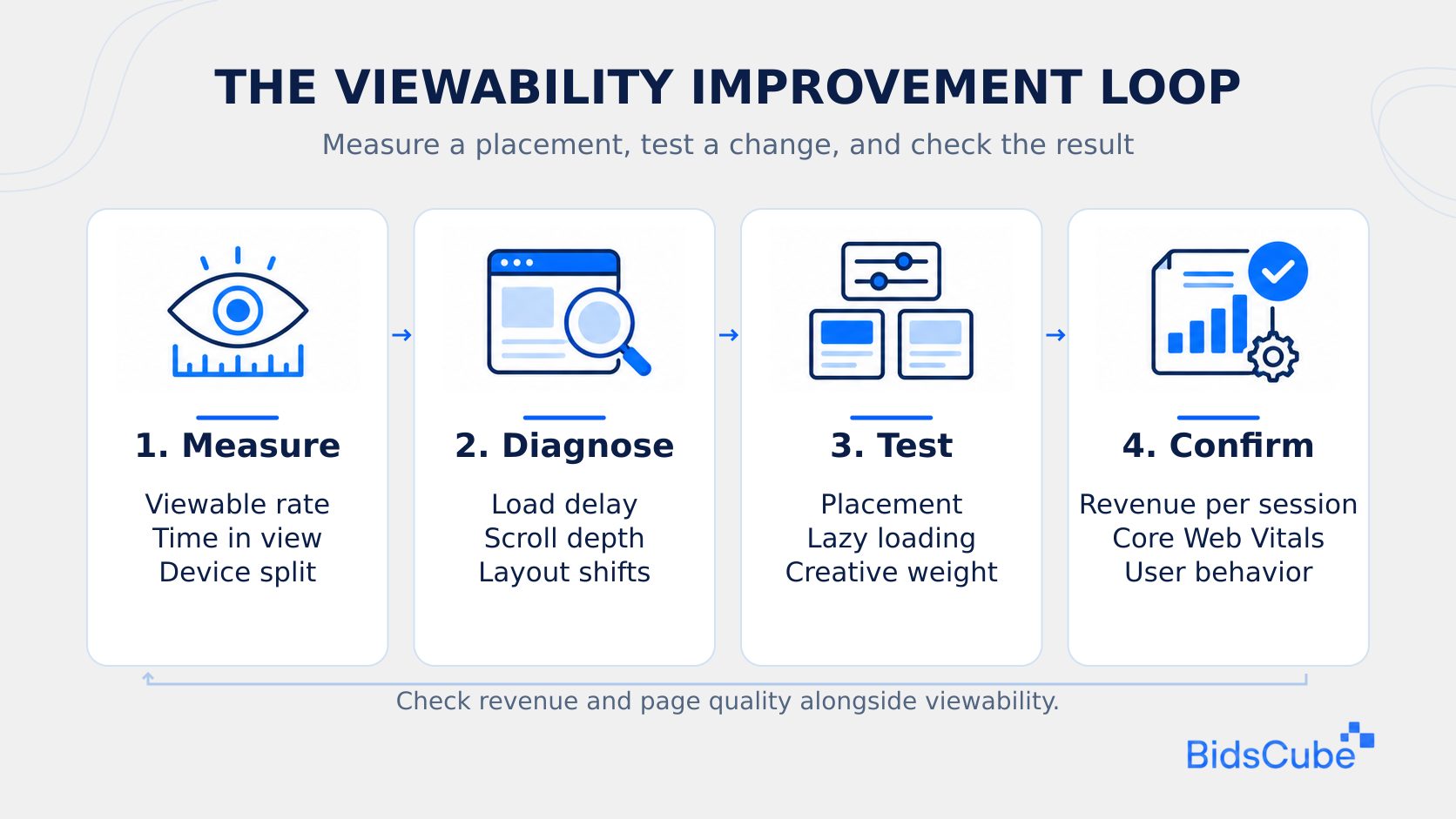
You cannot improve what you do not measure. Get your bearings before changing anything. Otherwise you will never figure out what change worked and which one lucked out. Get a two-week baseline, by unit and device, then test.
Measurement Methods
Most ad servers and verification tools already track view ability for you. They monitor how much time each ad appeared on screen and when. Viewable impressions are reported alongside measured impressions, with the ratio giving you your viewability rate. Breakdown of by ad unit, page type, and device. Your sites average will cover your bottom 10percent, and the bottom 10percent are where the money runs out.
Practical Improvements
Then move or cut the slots with the lowest scores. Then work on speed. Lower scripts, train creatives, and remove redirects. Stagger changes: Try out a new position or size, then compare it against the old for two to four weeks. That’s the whole routine to slowly improve ad viewability scores without guessing. Solving viewability problems starts with the placements that score lowest, not a full-site redesign.
Strategies to Improve Ad Viewability
Superior ad viewability is mostly about layout, speed and how much you respect the reader. Call it the visible ads method. Ads where people are looking, ads that loaded quickly and ads that got out of the way. The five strategies below take that concept and shape it into actions you will be doing this week:
- Readable layouts. Insert ads right after a compelling paragraph, in the middle of sections or alongside the body copy where people do a natural pause.
- Mobile first. Remember to use responsive units and test them on a few common phones, because a unit that seems well-placed on desktop can (in some cases) be 1/2 ↔ off screen of any small screen.
- Faster pages. Image compression, never to wonder in vain, eliminate unused scripts, CDN if you read a lot of readers.
- Careful sticky ads. Keep them slim and easy to close, like a thin footer on mobile.
- Smart refresh. Limit refresh to only in-view ads after a period of 30 or 60 seconds and check buyer rules first.
None of these works alone. Speed, layout, and sane formats add up. Most publishers see the biggest gains from combining two or three, not from chasing one perfect fix. That’s the honest version of ad viewability optimization. It’s a routine, not a trick. A practical ad viewability optimization plan follows that routine, with one measured change at a time.
Want more money from every viewable impression? The BidsCube SSP connects your inventory to buyers who pay more for ads people actually see. Let’s look at your slots together.
Case Studies: Success Stories in Improving Ad Viewability
Below are two examples of the typical statements publishers offer up once viewability becomes a serious topic. Your figures may be different but the trend is the same. Both started small. Neither of them touched site design in a big way. And that’s the idea, and that’s why you should model them before planning anything larger.
Case Study 1. A News Portal Lifts Visibility
Think of an average size news site with 45% viewability. Other readers only skimmed the headlines and moved on. The team moved its banners up and into the main column, and switched to faster hosting. Three months later, viewability sat near 65%, and bounce rate had dropped too, because pages loaded faster.
Case Study 2. A Lifestyle Blogger Adopts Header Bidding
Now, image a lifestyle blogger who desired more optimized results with less clutter on their page. Her experiment: Three sidebar ads were taken out, one small sticky in the lower corner added, and header bidding was implemented with low timeouts. Viewability grew from approximately 50% to 70% There were fewer, but better slots and buyers battled for them, thus revenue increased even with less ads on page.
Our tech staff and AdOps are formed by the best AdTech and MarTech industry specialists with 10+ years of proven track record!

FAQ
How to improve viewability without hurting user experience?
Place ads next to written content instead of somewhere in non-reserved margins. Try to restricted number per screen. Avoid pop-ups and autoplay with sound, and make sticky units small and easy to close. This is how to make ads more visible while not upsetting users. The page is comfortable to be on, and ads are viewed. A good way to learn how to improve viewability without hurting users is to test one placement change at a time.
How can I improve ad viewability and Core Web Vitals at the same time?
Pre-allocate space for the ads in each ad slot to avoid layout shifts on load. That protects your layout stability score. Ads that lazy load just before they appear on screens Use compressed creatives, avoid heavy scripts and limit header bidding timeouts. Ads are okay in slower pages and very visible only on faster pages.
How to improve video ad viewability specifically?
You should have the player somewhat high up on the page, as close to the main content as you can. Size it for phone screens. Play when in view, pause while the reader scrolls away, A small floating player, so long as it is easy to close, can help on article pages.
What is a good ad viewability score?
70% or higher is the percentage that many publishers want for display and that’s what most premium buyers will typically be expecting. The world wide average has a lower tendency. If you have a score somewhere about 70% make sure that the number doesn’t come from very few ads or an awkward layout. To see how to improve ad viewability scores, compare performance by placement and device before changing layout.
How often should I check my ad viewability score?
Examine your primary pages and ad units weekly. Never skip a monthly assessment, but in a bigger change to layout, ad setup or page speed, do a more profound review. You can also compare the same time frame between periods, so you more see the effect of seasonal traffic shifts (e.g. this December compared to last year, etc.).
Final Thoughts: Keeping Viewability High for the Long Run
Improved viewability is not a one-time initiative. It’s what grows from routine audits, tiny experiments and the gumption to tear away things that don’t work, even for those ad slots that used to be big money makers. Online sites that treat it as a habit see their highest scores stick around months after a one-off cleanup would have disappeared.
It’s also about more than this month’s revenue. Advertisers remember sites where their ads perform. Readers remember the sites that don’t suffocate them with banners. Get both right and steady demand follows. How to Boost Viewability of Your Ads on your site first? Faster pages, fewer but better-placed ads, and clear reports by ad unit. That’s enough to see real progress in a few weeks.
Ready to turn better viewability into better prices? Our AdOps team has 10+ years in AdTech and MarTech and runs the BidsCube SSP every day. Please book a call to know more.


