
A bakery doesn’t need customers in another country. It needs the people within a ten-minute walk, ideally around breakfast. That’s the whole idea behind location-based advertising, and it’s why the BidsCube DSP platform supports GPS targeting for campaigns that care about where people are as well as who they are.
Table of Contents
GPS targeting is an advertising method that allows you to target individuals within a specific distance from an exact location on a map. This type of targeting is dependent upon the device’s location signals. In terms of location-based targeting techniques, GPS targeting lies between broad geographical targeting (such as country/region/city) and geofencing (which creates a “virtual zone” and then reacts to users entering/leaving that area).
How GPS Targeting Works on BidsCube DSP
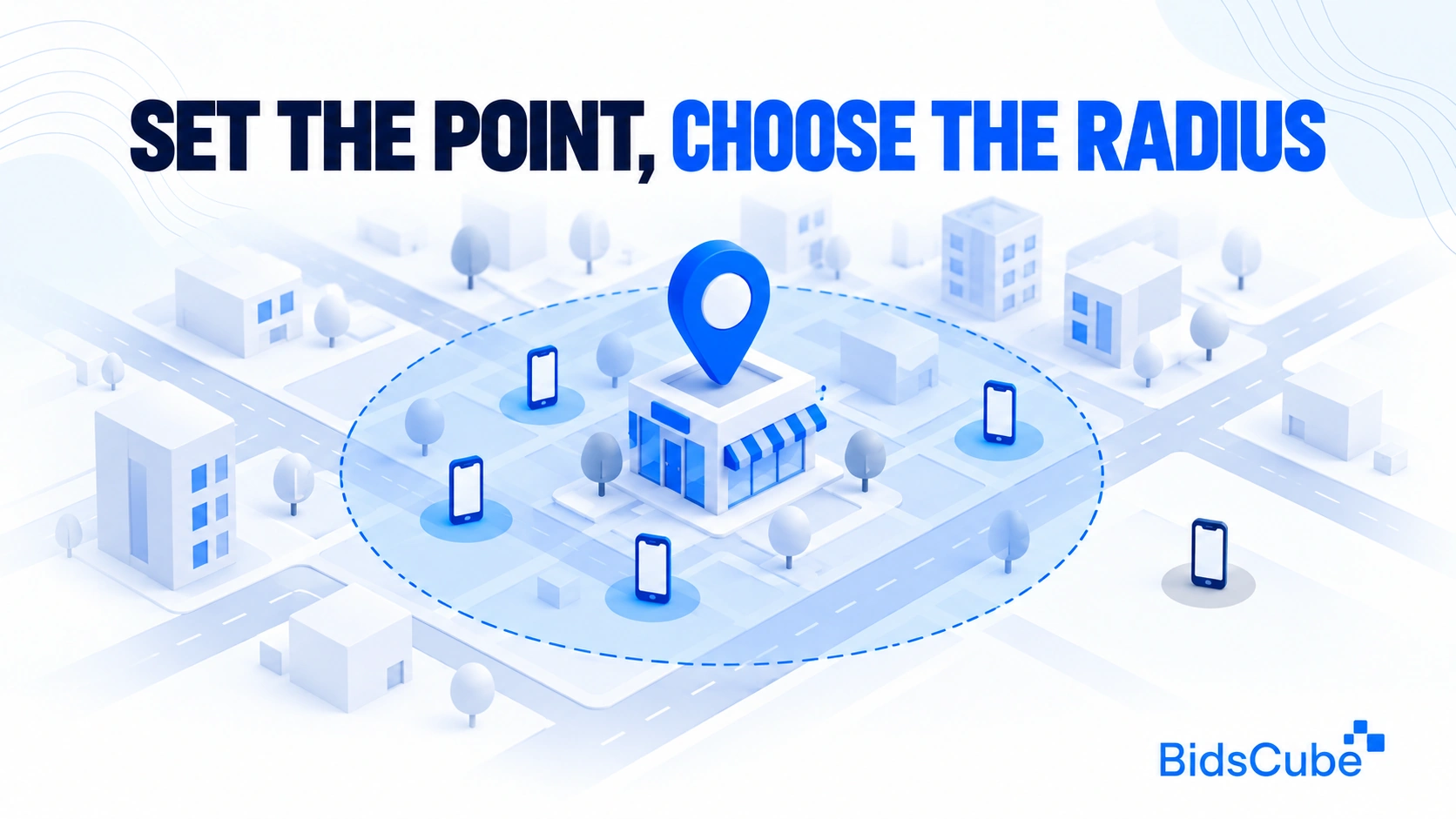
The idea is simple. Once the user has granted access to their location data, then mobile applications and/or devices will include a location signal (usually represented by latitude and longitude) as part of the user’s bid request. That signal travels with the bid request. The DSP verifies if that signal falls within any of your defined target zones before bidding. Radius targeting is the key parameter used here. For example, if you are advertising a local shop on a busy street you may want to set a very small radius. If you’re advertising a mall in a suburb or a car dealership you might choose to define a wider radius.
On BidsCube DSP, when you’re setting up or modifying a campaign (within the “Targeting Settings” section), you can activate GPS targeting. The user will view an interactive map. They can click on different areas on the map and change how far out from that area they want to look at. They can also load and save coordinate data. If you have many places in your campaign, loading/saving coordinate data can save you a lot of time.
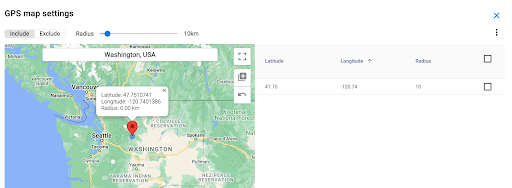
BidsCube DSP adds a few features that make GPS targeting more flexible:
- Multi-point targeting. A multi-point campaign allows you to set up multiple locations on a single map, with each location having its own unique area of coverage. This will allow you to reach numerous areas during a single campaign.
- Layered targeting. Combine demographic and behavioral filters with your location-based GPS filter to create a more specific target audience.
- Real-time adjustments. Adjust points and radiuses in real time, during the duration of your campaign, without having to start from scratch.
GPS Targeting vs Geofencing vs Geo Targeting: What’s the Difference?
People confuse these three terms and treat them as if they are the same. They aren’t, and the difference matters when you plan geo targeted ads. Here is how they compare:
| Method | How location is defined | Accuracy | When to use |
| Geo targeting | Country, region, city, or postal code, often from IP address | Broad | Regional campaigns, language markets, national offers |
| GPS targeting | Exact coordinates plus a radius | High, when devices share precise location | Stores, venues, and events where distance matters |
| Geofencing | A virtual zone with a boundary, entry and exit act as signals | High, depends on the platform | Building audiences of people who visited a place |
Geotargeting is the “big picture.” This type of targeting is based upon country, region, or city. On the other hand, GPS targeting is based upon geographic coordinates and a specified radius. Therefore, GPS targeting can be used to target a specific street corner. In addition, geofencing advertising goes beyond geotargeting. Geofencing advertising allows advertisers to define a virtual area. Once a user enters or exits this area, they may be segmented into a different group, or receive other types of advertising depending on what advertising platform is being utilized. That’s the short answer to the geofencing vs geotargeting question: one draws borders on a map, the other reacts to movement across them.
One honest note. A geofence doesn’t provide assurance that an ad will appear when a user enters the area. A user must also be using an online application or website that has available ad space; additionally, the bid for the ad must be successful. Geofencing ads are about who becomes eligible, not about a promised impression. On BidsCube DSP, the confirmed tools are multiple points with their own radius and coordinate import, which cover most hyperlocal advertising needs.
Benefits for Advertisers
Geo targeted ads give advertisers a few clear advantages:
- Relevance. People see offers that match where they are right now.
- Lower waste. Budget goes to high-potential areas instead of people who will never visit.
- Foot traffic. Timely advertisements can influence customers to visit a store, restaurant, or venue near where they are.
- Local messages. Each area can get its own offer, language, or creative.
The logic behind this is the same one that powers most targeted advertising algorithms: match the message to the moment. Location just happens to be one of the strongest signals of what someone might do next.
Use Cases: Where Location-Based Ads Work Best
Location based ads shine in a handful of industries. A few geo targeting examples, written as industry, scenario, and setup:
- Café or single store. Pull in passersby during busy hours. Use a small radius around one point.
- Retail chain. Promote the same sale in every branch. Import the coordinates of all locations at once.
- Event or festival. Reach people near the venue and the nearby transport hubs. Set several points, each with its own radius.
- Car dealers and real estate. I want to use my reach to find people living within a short distance of a car dealer’s showroom or a property for sale (an open house). Use a medium radius around each property.
Hyperlocal targeting includes three key elements: targeting very small geographic areas; offering consumers direct promotions of products/services; and providing advertisements when they would be most relevant to consumers’ locations. If you own a local business, you can learn about the other digital channels that complement hyperlocal advertising through our guide to digital marketing for local businesses.
Want to reach people near your stores, venues, or showrooms? The BidsCube DSP lets you set multiple points, adjust radiuses, and import coordinates in minutes. Let’s plan your first GPS campaign together.
Privacy and Consent: What to Know About Location Data
Location data advertising lives or dies on permission. Before an app or web browser can determine a person’s exact location, the user must provide their permission. Once they have provided this permission, the ways in which the data collected may be utilized depend upon the country where the data was collected, the reason for collecting the data, whether the user received a clear explanation of how the data will be used, and whether there is a legal justification for using the data.
Regional rules vary. Under CCPA, precise location is considered “sensitive personal information” which gives consumers the right to control how that information will be used or shared. This doesn’t create a global opt-in requirement for all CCPA cases; however, it does require a high level of care when using consumer location data. GDPR has its own set of rules. Our guide to privacy-first advertising explains how to build campaigns that respect these limits.
How to Measure the Results of GPS Campaigns
The first thing you will do is use the standard digital numbers (impressions, CTR, conversions, and CPA), divided by location. They tell you which areas respond and which ones waste budget. Our article on measuring ad performance covers the core metrics.
Physical visits, on the other hand, are quite a different animal. Store visit attribution and foot traffic attribution each use different types of location signal; they also require some form of process to measure and usually a measurement partner. Store visit attribution is essentially comparing those that saw the ad to those that didn’t see it, and determining how many extra visits were generated. If store visits is the goal of your campaign, you should develop a strategy for store visit attribution with a measurement partner before you launch your campaign, so that you know what type of data you can expect.
FAQ
What is GPS targeting in advertising?
This is an advertisement that can be seen by individuals who are located within a given radius around particular GPS coordinates, based on the location information provided through their mobile devices. It is a far more precise way to advertise than simply targeting by city or area.
What is the difference between GPS targeting and geofencing?
GPS targeting provides ads to people who are close to a specific point. Geofencing advertising sets up a virtual boundary around a certain geographic location and interprets someone crossing into or out of that boundary as a trigger. This is generally used to define target audiences. Simply crossing the boundary into the area doesn’t mean that someone will receive an advertisement.
How accurate is GPS targeting?
The accuracy of the location information will vary depending on the type of equipment used, the nature of the location signal (i.e., if it is from a public street or within a shopping center), and the way in which the settings were adjusted. Applications that require location access will generally provide the most accurate location data; whereas location data based on IP addresses are significantly less accurate.
Do users need to opt in for location-based ads?
An application/browser will ask for permission before it can access a user’s location. How long this process takes is dependent upon the location laws of the area in which the application/browser is being used, what the application/browser will do with the location data, and how the user was notified of the request. Thus, there are variations in the rules regarding location data usage between various countries (e.g., U.S. vs. EU).
How does BidsCube DSP support GPS targeting?
The BidsCube DSP supports multi-point targeting with a radius per point, layered targeting with demographic and behavioral data, import and export of coordinates, and real-time adjustments while campaigns run.
Conclusion
Using GPS targeting will help you reach your target audience in real-time, based on their current locations. Choose your target areas, select appropriate radius sizes, combine this with other demographic information about your audience, and maintain compliance with privacy regulations regarding location data. BidsCube’s DSP makes setting up your campaign easy through its interface, including the ability to import large amounts of coordinate data. Additionally, BidsCube provides a white-label version of their platform for those who wish to offer this service under their own brand. Connect with the BidsCube team to plan a location-based campaign that fits your goals.
Our tech staff and AdOps are formed by the best AdTech and MarTech industry specialists with 10+ years of proven track record!