



TL;DR
- Fill rate is the share of ad requests that come back with a paid ad.
- Formula: fill rate = (filled impressions ÷ ad requests) × 100.
- Healthy ranges differ by format. Web display often sits at 60 to 80%. CTV can reach 90 to 99%.
- A high fill rate doesn’t always mean more money. Look at RPM, which is fill rate × eCPM.
- Fill drops because of high floors, thin demand, tech errors, and buyer-side filters.
- Header bidding, more demand partners, and dynamic floors are the fastest fixes.
- 100% fill can be a warning sign, not a win.
Table of Contents
Fill rate is one of the first numbers a publisher checks. It tells you if your traffic is turning into paid ads. By itself, though, it means nothing. You can make less than 75 percent fill at a $0.20 eCPM with a 95% fill rate at $1.00. The real picture is only visible once you have both numbers.
Both sides use the term. Publishers track it through their ad exchange or SSP. Ad networks use it to show how well they deliver ads. So when people talk about ad network fill rate, they mean the same idea from the network’s side.
What counts as “good” depends on the format. Coinis’ 2026 benchmarks put typical web display fill at 60 to 80%, mobile in-app is at 80 to 95% and CTV and premium video will see fill rates of up to 90 to 99%.
Let’s start with the basics.
What is fill rate?
So, what is fill rate? It’s the percentage of ad requests that receive a paid ad in return. Some people call it the filling rate. That’s the short answer to what is fill rate in advertising. You can find a longer definition in our fill rate glossary.
One detail trips people up. An ad request is not the same as an ad impression.
- Ad request. Your page or app asks for an ad.
- Ad impression. An ad actually shows up.
A request doesn’t promise an impression. In other words, if no buyer bids, or the bid is very low, the slot is left empty. The fill rate is precisely that gap between requests and impressions.
Fill rate formula (with worked example)
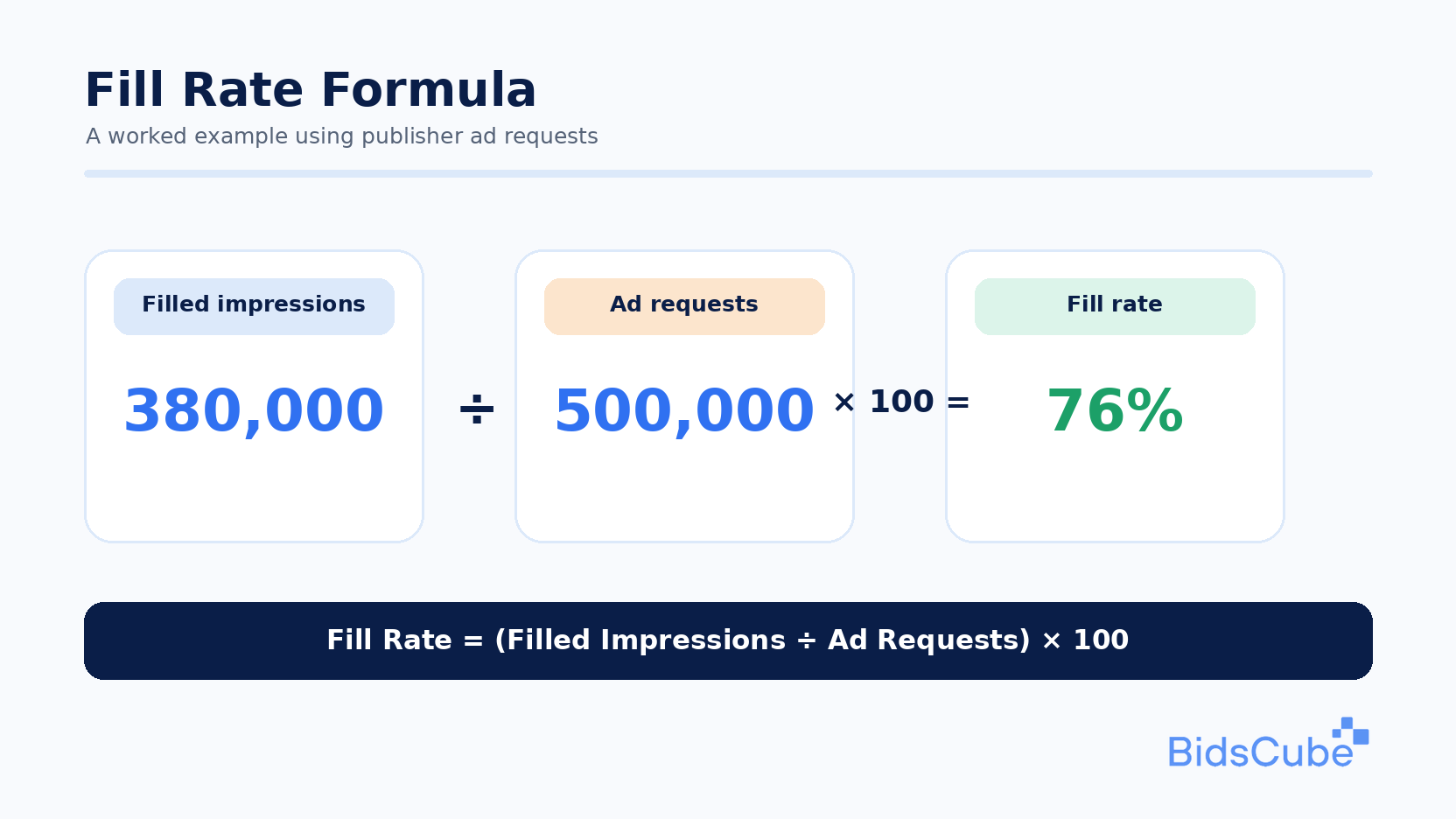
Here’s the fill rate formula advertising teams use:
Fill rate = (filled impressions ÷ ad requests) × 100
Let’s run it with simple numbers.
Your site sends 500,000 ad requests in a month. Buyers fill 380,000 of them.
380,000 ÷ 500,000 = 0.76
0.76 × 100 = 76%
Your fill rate is 76%. That means 120,000 requests went unsold. Those are slots where you earned nothing. The fill rate formula advertising is easy. It is not easy to get the inputs right. Your ad server and SSP must count requests the same way, otherwise the numbers will differ.
Average fill rate benchmarks by inventory type
What are fill rates like across formats? Here’s a quick guide:
| Inventory type | Typical fill rate | Notes |
|---|---|---|
| Web display (open auction) | 60 to 80% | Tier-1 traffic hits the top end. Made-for-advertising (MFA) filters pull it down. |
| Mobile in-app banner | 80 to 95% | A mediation stack pushes fill close to 100%. |
| Video pre-roll / mid-roll | 75 to 90% | Brand-safety filters lower fill on user-generated content. |
| CTV / OTT | 90 to 99% | Premium inventory and direct deals lead. |
| Native | 70 to 90% | Depends on creative quality and fit. |
Sources: Coinis, 2026 (display, in-app, video, and CTV). Native is a general industry range.
Use these as a guide, not a target. Your niche, geo, and traffic quality all shift the numbers.
Fill rate vs eCPM vs RPM
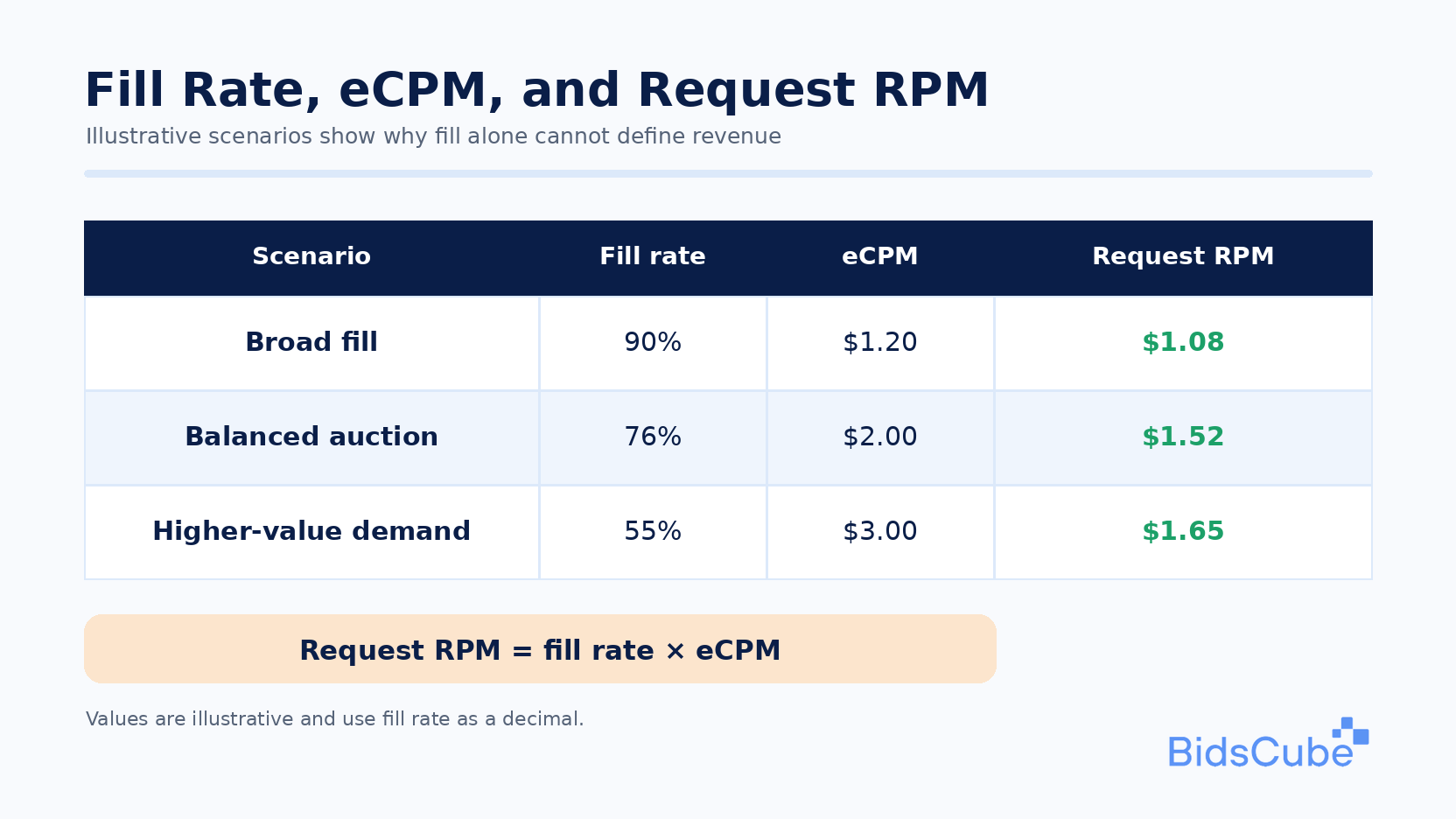
Here’s where many publishers go wrong. A high fill rate doesn’t always mean more revenue.
Three numbers work together:
- Fill rate. How many requests get filled.
- eCPM. What you earn per 1,000 impressions. Our guide on eCPM covers it in depth.
- RPM. What you earn per 1,000 requests or page views.
They connect like this:
RPM = fill rate × eCPM
Take two setups:
| Setup | Fill rate | eCPM | RPM |
|---|---|---|---|
| A: low floor | 95% | $0.80 | $0.76 |
| B: higher floor | 70% | $1.40 | $0.98 |
Setup B fills less. It still earns about 29% more per 1,000 requests.
That’s the trade-off. A higher floor price lowers fill but can raise eCPM. A lower floor does the opposite. The goal is the best RPM, not the best single number.
Why fill rate drops: common causes
Low fill rarely has one cause. These four show up most often.
- Floor prices set too high. If your floor sits above what buyers will pay, their bids get cut before the auction. The slot stays empty.
- Thin demand. One SSP or one network isn’t enough. An old waterfall setup makes it worse. It calls buyers one at a time, and many never get a chance to bid.
- Tech errors. Adapter timeouts, slow load times, and wrong sizes or formats all kill bids. Latency is a quiet one. A bid that arrives 200 ms too late counts as no bid.
- Buyer-side filters. DSPs run brand-safety and MFA filters. If your pages trip them, part of your traffic gets blocked before anyone bids.
Sometimes the cause is plain seasonality. January demand is soft almost everywhere. Don’t panic over a dip that hits every publisher at once.
Is your fill rate stuck? The BidsCube SSP connects your inventory to a wide pool of buyers in real time. Let’s look at your setup together.
How to improve fill rate
Here’s how to improve fill rate step by step.
Move from waterfall to header bidding. Header bidding lets several SSPs bid on the same impression at once. More bidders, more fills. Our header bidding and Prebid guide explains the setup. You can also compare both models in header bidding vs waterfall.
- Add more demand sources. Don’t rely on one partner. Link multiple SSPs and networks with an ad exchange. Most of them currently speak OpenRTB, so it’s easier than in the past to add partners.
- Use dynamic floor prices. A single global floor overprices some traffic and underprices the rest. Dynamic floors adjust per auction based on demand.
- Audit your tech often. Validate adapter timeouts, throughput, and format support. Fix broken tags. Small fixes here add up fast.
- Keep viewability up. Buyers bid more often on ads people can see. Better placement means better fill.
That’s how to improve fill rate without hurting price. Each step adds bids instead of lowering standards.
Is 100% fill rate always a good thing?
No. A perfect score can hide a problem.
100% fill often means your floors are too low. Any bid wins, even a tiny one. It may also mean bad ads fill your slots. This damages user experience and with time damages your brand. Think of it like a restaurant that’s always full because the food is nearly free. The tables are busy. The business isn’t healthy.
So watch RPM as your main metric. Use fill rate ads data as a health check, not a goal in itself.
How BidsCube Can Help
The BidsCube SSP helps publishers fill more of their inventory without dropping prices.
- Header bidding support. Many buyers compete for each impression at once.
- Wide demand pool. You have real-time auctions that can provide you with a great number of DSPs and partners.
- High fill. Major publishers on BidsCube SSP attain fill rates from 85 to 100% thanks to header bidding and wide demand.
- Floor controls and reports. Set floors by geo, device, and format, and track fill, eCPM, and RPM in real time.
Advertisers can buy that same inventory through the BidsCube DSP. BidsCube has 10+ years in programmatic and 230+ clients. See what they say on Clutch.
Summary
If you came here asking what is fill rate, here’s the short version. It shows how much of your traffic turns into paid ads. It’s a good first check, but it’s only half the story. Pair it with eCPM, and judge results by RPM. When fill drops, look at floors, demand, tech, and filters first. Fix those, and fill rate advertising results tend to follow.
Talk to BidsCube about raising your fill rate without cutting your prices.
Our tech staff and AdOps are formed by the best AdTech and MarTech industry specialists with 10+ years of proven track record!

FAQ
1. What is a good fill rate for a publisher?
It depends on the format. Web display often sits at 60 to 80%. In-app reaches 80 to 95%. CTV can hit 90 to 99%. Some people search for this as “filling rate,” but the idea is the same.
2. How is fill rate calculated?
Impressions CPM = (Filled impressions ÷ Ad Requests) × 100 The effect, for example is 380000 ÷ 500000 × 100 = 76%.
3. Why is my fill rate low even though I get plenty of traffic?
Traffic alone doesn’t fill slots. Bids do. High floors, scarcity of demand partners or slow adaption and buyer-side filters, amongst others, can all leave slots empty. If one partner in your hand full race pauses spend, it can trigger a significant drop across the board for your ad network fill rate price.
4. Does a 100% fill rate mean my site is doing well?
Not always. It can mean your floors are too low. Check RPM before you celebrate.
5. What is the difference between fill rate and eCPM?
The fill rate indicates the number of requests that receive an ad. eCPM is the way of showing how much money you get paid for 1,000 impressions. Fill rate ads reports and eCPM reports together give you RPM. That’s the full answer to what is fill rate in advertising versus price.
6. How does header bidding improve fill rate?
Header bidding lets many SSPs bid on each impression at the same time. More bidders mean more chances to fill. It’s one of the best answers to “what are fill rates held back by?” in older setups. It also lifts fill rate advertising results without lowering floors.
This Article's Ad Tech terms


