



2026 Update: Under Chrome’s existing user-choice model, third-party cookies will still be allowed. Of course, Safari prevents them by default, and Firefox partitions cookies by site to prevent them from tracking users across sites.
Table of Contents
- First-Party vs Second-Party vs Third-Party Cookies
- History of Cookies
- First-Party Cookies
- Third-Party Cookies
- Third-Party Cookies vs First-Party Cookies
- What Are Second-Party Cookies?
- First-Party Data vs Third-Party Data Beyond Browser Cookies
- Server-Set Cookies vs Client-Side Cookies
- Cookie Deprecation Update 2026: What Happened
- What This Means for Advertisers and Publishers
- Main Points
A website remembers the items in a shopping cart. An advertising company recognizes the same browser on two different websites. Both actions can involve cookies, but browser rules treat them very differently.
Safari blocks third-party cookies by default. Firefox places cookies into separate site-level storage. Chrome lets people change third-party cookie access through its privacy settings, while Incognito mode blocks them by default.
This browser split changes the debate around first-party data vs third-party data. There is no single date when cookies disappear. There are browser restrictions and consent records, local laws, publisher audiences, server events, and many forms of identity data that advertisers and publishers now have to work with.
First-Party vs Second-Party vs Third-Party Cookies
| Criterion | First-Party | Second-Party | Third-Party |
| Source | The website a person visits | A company sharing its own records with a business partner | A separate domain or outside provider |
| Common purpose | Login, preferences, carts, site analytics | Partner campaigns and shared audience analysis | Cross-site measurement, retargeting, and profiling |
| Browser treatment | Accepted by major browsers | No separate technical cookie category | Blocked, separated, or allowed based on the browser and settings |
| Relationship with the person | Direct | Direct for the company that collected the records | Usually indirect |
| Main concern | Poor retention rules or weak consent records | Unclear sharing terms | Cross-site tracking and limited browser access |
“Second-party cookie” is a marketing term rather than a separate browser technology. It usually refers to one company sharing its first-party records directly with another company under a commercial agreement.
History of Cookies
- 1994: Netscape developed the HTTP cookie so that websites could remember information sent on each session.
- Early 2000s: Cookies started being adopted by web sites for logins, analytics, advertising and page preferences.
- 2011: European privacy rules focused even more on cookie notices and consent
- 2018: GDPR applies in full force across the European Union as of May 25, 2018. This made obligations on firms handling personal data stricter.
- 2020: Safari moved to full third-party cookie blocking through Intelligent Tracking Prevention.
- 2022: Firefox rolled out Total Cookie Protection, which keeps cookies in separate storage for each website.
- 2024: Chrome restricted third-party cookies for 1% of users during testing. Google later dropped its plan to remove them for everyone.
- 2025: Google kept Chrome’s existing privacy-settings model and cancelled plans for a separate third-party cookie prompt.
- October 2025: Google retired several low-adoption advertising APIs while keeping CHIPS, FedCM, and Private State Tokens.
The prediction that Chrome would end third-party cookies in 2023 did not come true. Websites now need to work when these cookies are available, restricted, separated, or blocked.
First-Party Cookies
First-party cookies originate from the site displaying in the browser address bar. They help that website remember a person’s activity within its own domain. A server may send a cookie through an HTTP response. Browser-side code may also create one when the browser permits it.
How First-Party Cookies Are Created
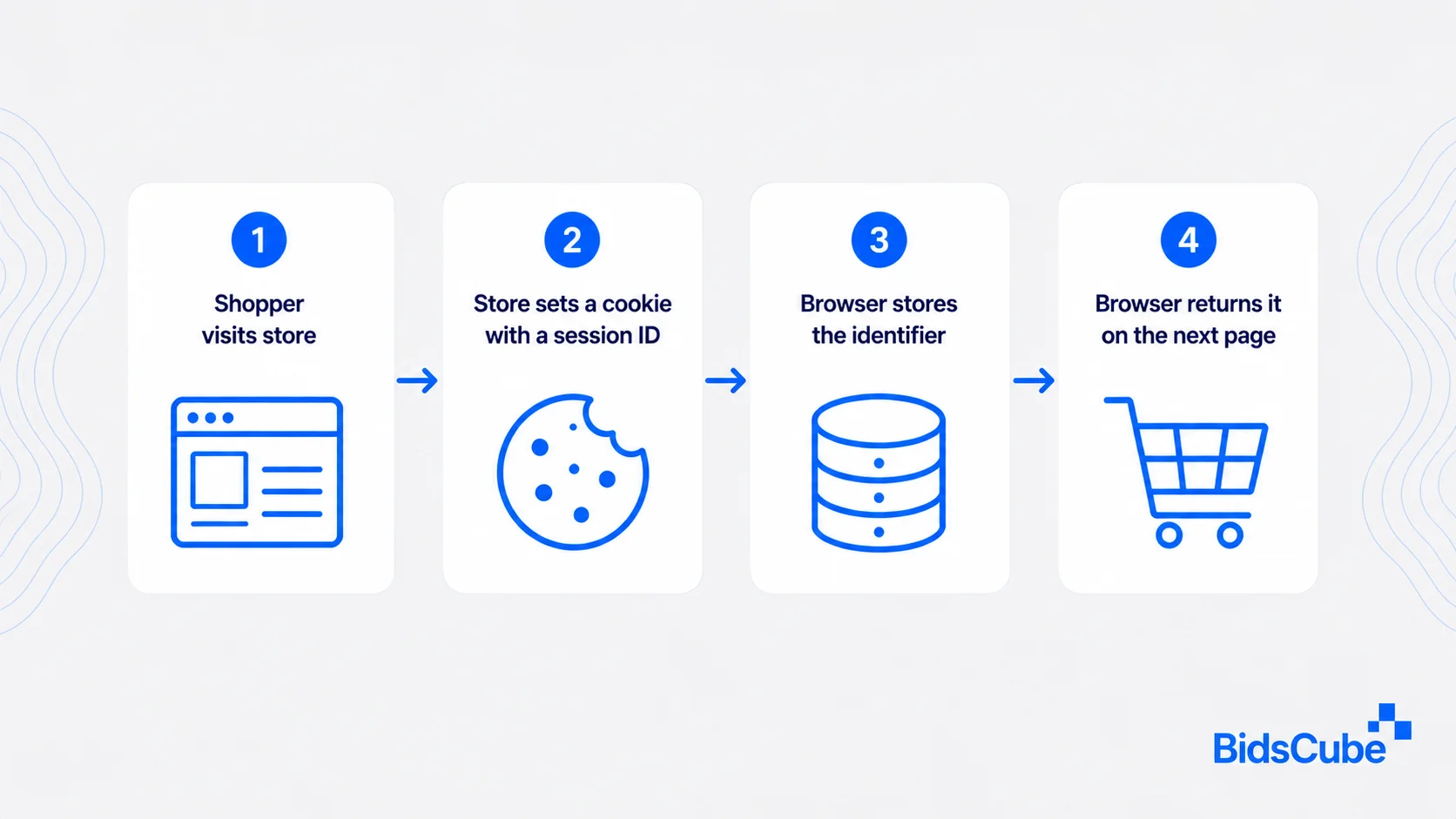
The cookie may contain the saved information itself. Often, it simply holds an ID that refers to a record in the database of that store.
First-Party Cookie Examples
- Authentication cookies keep a person signed in during a session.
- Preference cookies remember language, region, layout, or accessibility choices.
- Shopping cart cookies retain selected products before checkout.
- Analytics cookies record activity on the same website.
- Consent cookies save the person’s tracking choices.
Sessions, carts, preferences, and direct-site Measurement are usually managed via first-party cookies. Cross-site advertising, attribution, frequency and audience grouping is generally managed by third-party cookies.
A privacy-first advertising model begins with the fundamental question that needs to be asked; either this data is needed, and can a rationale of why it is needed be explained to the individual providing such information?
Third-Party Cookies
Third party cookies come from another domain, a different computer than what the address bar shows. They have been used by advertising firms, analytics vendors, social networks, and embedded service providers to recognize browsers on multiple websites.
Imagine a news site loading an ad from an outside advertising domain. That outside domain may ask the browser to save a cookie. If another website loads content from the same advertising domain, the browser may return the cookie when its settings permit it.
That process can connect visits across different sites.
Third-Party Cookie Examples
- Cookie targeting is used to serve ads to individuals who visited a page with one of your products or services.
- Cross-site measurement cookies connect ad exposure with later site activity.
- Social media cookies record interaction with embedded buttons or widgets.
- Audience cookies group browsers by inferred interests or browsing patterns.
The underlying question in third-party data vs first-party data debate is not which type of data consistently outperforms the other. There are checks teams must do: Who collected the data, how fresh it is and whether the individual opted in to its use and whether the source fits the campaign.
Third-Party Cookies vs First-Party Cookies
Origin: The visited website creates a first-party cookie. A different domain creates a third-party cookie.
Purpose: Third-party cookies are usually used for ads, while first-party cookies are generally used to regulate sessions, carts, preferences and direct-site Measurement. Generally, cross-site advertisement and attribution, frequency and audience grouping are controlled by third-party cookies.
Access: The domain that issued a cookie can read it when the browser permits access. Other domains cannot freely open it.
Duration: Either cookie type may last for a session or remain for months. Browser rules and expiration dates may shorten its life.
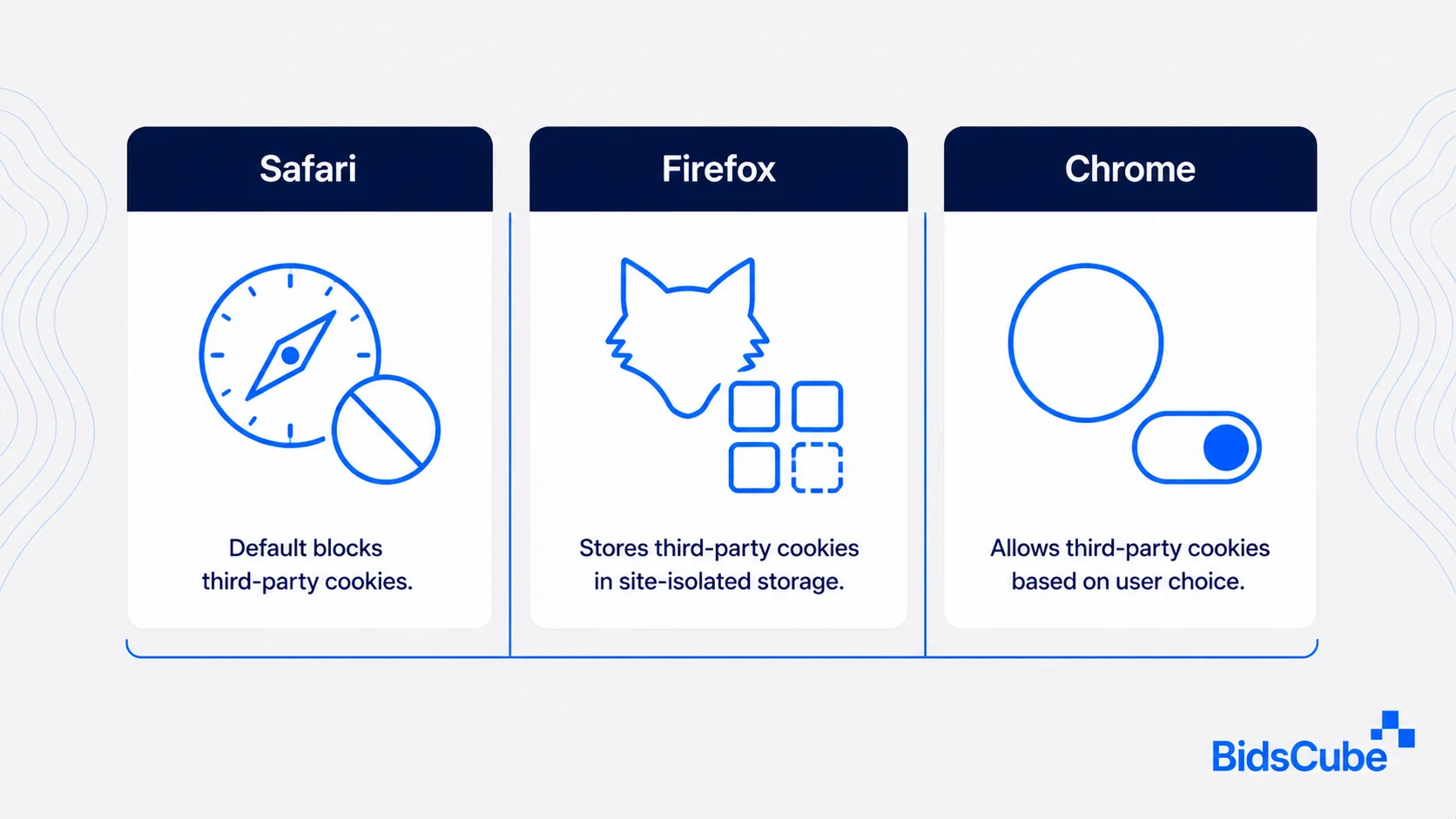
Browser Rules: Safari blocks third-party cookies by default. Firefox confines cookies to the site where they were created. Chrome permits them by default for most users, though people can block them for all sites or create site-level exceptions.
A media plan should not assume that every browser will return the same identifier. Cookieless advertising strategies may use publisher records, first-party audiences, page subject matter, or consented identity methods.
What Are Second-Party Cookies?
A second-party cookie is usually another company’s first-party record shared through a direct agreement. Browsers do not recognize “second-party” as a separate cookie class.
Take an airline and a hotel chain. The airline may share an approved customer group with the hotel company for a joint travel offer. The records remain first-party data for the airline. The hotel company receives them as second-party data.
Both companies need written terms covering purpose, access, retention, security, and deletion. They also need to check whether the original consent covers the proposed use.
The global data privacy regulations overview outlines the regional laws that may affect these agreements.
First-Party Data vs Third-Party Data Beyond Browser Cookies
The first-party data and third-party data discussion goes far beyond unremarkable tiny browser files.
First-party records may include CRM entries, purchase records, email responses, app events, customer service tickets, survey answers, and server conversion events. Many of these records do not rely on browser cookies at all.
Third-party records may come from research firms, measurement companies, publisher partners, or outside audience providers. An individual campaign can use both third-party data and first-party data but the former is governed by its own set of consent, ownership, refresh and error rates.
Server-Set Cookies vs Client-Side Cookies
These types of cookies can be created or altered by code running in the browser, often JavaScript. They may store page preferences, campaign details, or small session values.
Server-set cookies reach the browser through HTTP response headers. The browser still stores them. The server may keep the related account or session information in a database and place only a reference number inside the cookie.
Server-set cookies may use the HttpOnly attribute. This stops browser-side JavaScript from reading the cookie and lowers exposure to some script-based attacks.
A server-set cookie is not stored only on the server. The browser still holds the cookie and returns it with later requests.
Cookie Deprecation Update 2026: What Happened
The cookie deprecation 2026 story ended with a change of direction rather than a complete shutdown.
In July 2024, Google said Chrome would not remove third-party cookies as previously planned. The company proposed a stronger user-choice model instead.
In April 2025, Google kept the existing Chrome settings and dropped the proposed standalone prompt. People can change third-party cookie access in the browser settings. Chrome Incognito blocks these cookies by default.
Google announces plans to retire privacy sandbox advertising technologies by October 17, 2025 after market adoption was low. The topics retired by the group included Topics, Protected Audience, Attribution Reporting, IP Protection, Private Aggregation, and various Android APIs.
Google kept CHIPS, FedCM, and Private State Tokens. These technologies cover partitioned cookie storage, identity sign-in flows, and fraud checks rather than broad audience targeting and cross-site attribution.
The latest Google Chrome cookies update leaves advertisers and publishers with mixed browser conditions. Third-party cookies remain available for many Chrome users. Cookies that were the same might not work in Safari, might “live” in different storage in Firefox, or might melt away if someone tripped a browser privacy setting.
Google advises website owners to test their pages with and without third-party cookie access.
What This Means for Advertisers and Publishers
Cookies have not disappeared. The extent of their reach now can depend on the browser, browsing mode, site permissions, and the user’s settings.
Nobody uses first-party cookies anymore, logins, carts, preferences and direct site measurement are handled by them. Third-party cookies are still functional for many Chrome users, but cannot be the sole identifier in a campaign.
The comparison of third-party data vs first-party data should focus on source quality, permission, accuracy, ownership, and age. The same applies when teams combine first-party data and third-party data in one media plan.
Publisher records, server events, and contextual advertising as an alternative to cookie tracking give teams other ways to buy and measure media when cross-site identifiers are missing.
BidsCube DSP lets advertisers upload their own user IDs or IP-based segments and create groups from previous ad activity. BidsCube SSP gives publishers inventory controls and live reporting.
Plan for Mixed Cookie Access
Review the BidsCube DSP for audience buying and the BidsCube SSP for publisher inventory and reporting.
Main Points
- Chrome did not remove third-party cookies for all users.
- Safari blocks third-party cookies by default.
- Firefox separates cookies by website to limit cross-site tracking.
- First-party cookies still handle logins, preferences, carts, and direct measurement.
- Second-party data is another company’s first-party data shared through an agreement.
- Third-party data and first-party data cover records outside browser cookies.
- Websites and ad campaigns should work when third-party cookies are present or absent.


